
3 (free) QBeeQ plugins that can deliver value in under 3 minutes

Unlock value in your Sisense dashboards today using the Starter PowerUp today!
No trials. No contracts. No setup headaches.
The solutions that can make the biggest difference aren't always the ones that take the longest to implement. These three plugins are free, take under three minutes to set up, and start working immediately in your existing Sisense dashboards. Each one solves a pain point your users are probably already experiencing. The only question is which one you try first.
🔗 Share Dashboards With Filters Intact
You spot something in your data, apply a handful of filters to isolate the view, and drop the dashboard link into Slack for your team. Now you're fielding messages asking which filters you had on, walking them through the setup, and hoping everyone ends up looking at the same thing. All because the filter scopes are not included natively in the dashboard URL.
The same thing happens in weekly reviews when you share a link in the meeting invite, or in reports where you're referencing a specific slice of data. Without context preservation, a shared link isn't really sharing the insight; it's just sharing the starting point.

Dashboard URL Link solves this by retaining filter settings directly in the URL. With a single click from the dashboard header, users can copy a shareable link to their clipboard, complete with all applied filters.
Links can also be shortened for cleaner sharing, and you have full control over settings like URL length, logging, and retention policies. Expired links can even be cleaned up automatically, so shared links stay relevant over time. What you see is exactly what the recipient sees. Copy the link. Share it. Done.
👁️ Add Depth Without Adding Widgets
A stakeholder glances at a chart and immediately asks: "What was this number last quarter? Is this above or below target?" You know the answer. It's in another widget, two scrolls down the dashboard. Or it's not on the dashboard at all, because adding it would mean another chart, more clutter, and a layout that already feels crowded.
Advanced Tooltip gives designers two ways to improve on Sisense's native tooltip experience.
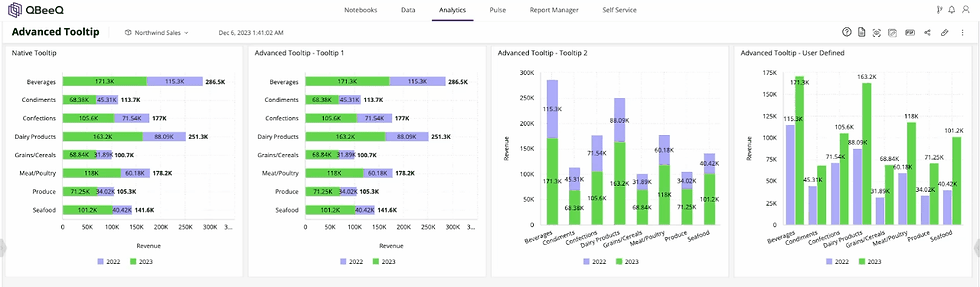
The first is a set of pre-styled tooltip designs that immediately look more polished than the default. No configuration required, just a cleaner presentation out of the box. The second is a fully customizable tooltip that lets designers add additional data as context, like prior period values, targets, or supporting metrics, without adding new fields to the chart or building additional widgets.
More context, no clutter, no layout changes required. It's one of the fastest ways to make a dashboard feel smarter without touching the structure at all.
🏁 Speed Up Dashboards Without a Rebuild
Someone opens a dashboard to check one KPI. In the background, every chart on the page fires off a query and starts loading.
Pivot tables, scatter charts, and trend lines, they weren't even looking at. The dashboard crawls. By the time it's done, the moment has passed. This is especially common on shared dashboards built for multiple teams, or on executive dashboards that pack in a lot of charts to cover every angle.
Auto-refresh sounds like a feature, but for dashboards that users dip in and out of throughout the day, it's usually just unnecessary load.

Load Widget on Demand flips that dynamic. Instead of loading everything automatically, dashboards wait for the user to refresh the widgets they actually care about. The result is a noticeably faster, more responsive experience — especially for heavy visualizations like pivot tables and scatter charts.
If users have ever complained that your dashboards are slow, this is the fastest fix available.
The Bottom Line
These three plugins are just the beginning. The Starter PowerUp includes 10 production-ready Sisense plugins — all free, all fully functional, with no trial period, no expiry, and no contract required. Every plugin is actively maintained and supported, and any new plugins added to the bundle are automatically available to you.
No procurement cycle. No budget approval. No lengthy setup. Just tools that solve real problems your users are already experiencing, deployable today in less time than it takes to sit through another dashboard performance complaint.
If you're already using Sisense, the Starter PowerUp is the fastest way to close the gap between what your platform can do and what your users actually experience. And there's no reason to wait.
QBeeQ is a Sisense Gold Implementation Partner, building plugins and solutions that extend the power of Sisense. We help teams get more performance, flexibility, and value from their analytics investment. From free tools like the Starter PowerUp to enterprise-grade implementations, QBeeQ works with Sisense teams at every stage of their analytics journey.


Comments